Web design can be deceptively difficult, as it involves achieving a design that is both usable and pleasing, delivers information and builds brand, is technically sound and visually coherent.
Friday, July 31, 2009
UI/UX Design Pattern Repository
To start with here are some which I know
http://ui-patterns.com/
http://uipatternfactory.com/
http://quince.infragistics.com/UX-Design-Patterns.aspx
http://developer.yahoo.com/ypatterns/
http://www.welie.com/patterns/
http://www.designingsocialinterfaces.com/patterns.wiki/index.php?title=Main_Page
Saturday, July 25, 2009
Tasting Life
I have a very special friend named Ethan, and in just a few days, the grownups in his life will be celebrating his first birthday. Plenty of my friends have children, but this is the first time in my adult life that I’ve been so intimate with the day-to-day, inch-by-inch development of a human tadpole.
In the few months that my friend’s diet has expanded beyond the bottled facsimile of breast milk, I’ve had the privilege of observing his experiences with this thing called food, a front-row seat at the high-chair theater, complete with bowl tossing, high-pitched screams and other primal expressions of gustatory joy.
One night, I cooked a small pot of red lentils, suggesting to his mother that it’s baby food as Mother Nature had intended, self-pureeing in about 25 minutes. She agrees to the experiment, eager for variety beyond sweet potatoes and applesauce, but me, I’ve got bigger aspirations. I’m secretly hoping that on some level the kid will intuitively understand that his auntie is trying to expose him to the world, that lentils just aren’t lentils; they’re culture and history and nutrition and agriculture. (I also plan to introduce him to the sounds of Miles Davis before his second birthday – if Mister MA doesn’t beat me to it.)
I wait for his reaction. At first, he grimaces, a sign of cranky uncertainty, but he forges ahead, masticating like a champ. He sings that “num, num, num” song and the chubby legs begin to swing in excitement beneath the counter. He grins wide, with all four teeth, and readily receives a second helping. Folks, I think we’ve got a winner.
As I prepared for today’s final entry, I thought a lot about Ethan and the purity of his experience with food. It’s free of judgment and pre-conceived notions and instead filled with wonder, joy and openness, a sensory interaction of the highest order. And now his tongue knows lentils, something my tongue didn’t experience until I was in my 20s.
Ethan may grow up to hate lentils -- and kamut bulgur and all the other things I’ve got planned for him to taste. But taste is all you can do in this life. My father was insistent that we try everything at least once before deciding we didn’t like something on our plates, and I think that’s a good rule of thumb for many aspects of life.
Try everything once. Be open to the flavors, textures and aromas that life presents you, both smooth and velvety as well as sharp and bitter. Open your mouth and taste something new everyday -- or something familiar in a different way.
When was the last time you bit into a radish? Really tasted mustard from a spoon? Listened to the crunch of a potato chip? Smelled the perfume of sauteed onions?
Life is delicious, every minute of every day. Life is also precious. So let’s get busy.
Thank you for spending three years with me in this space. Stay in touch for news and updates about the next chapter.
Keep the spirit of cooking alive!
Wednesday, July 22, 2009
10 Strategies to Use When Creating Widgets
At SignalFive, we are always looking out for cutting-edge ways to deliver marketing solutions to our clients. One such solution is the widget. A widget is a small app, usually written in a language such as Flash, that can be used to promote a company’s service or product. We recently finished work on a widget for a popular DJ, and are eager to flex our muscles and work on more of these social, mini-apps….And now that Facebook is the stickiest site out there on the web, why not distribute your content on it in the form of a widget?
What are some considerations to use when building a widget? Here are some thoughts to keep in mind:

1 ) Integrate advertising that is relevant and unobtrusive. The “message” has to be seamlessly integrated to appear natural with the rest of the content, as well as the medium (video, audio, static).
This should be pretty clear: Your widget should be a reflection of your brand, your culture, and offer users an insight into what your company does, and what it can offer. Look, for example at Trulia’s TruliaMap, a widget that you can use to show your Real Estate listings. Integrating relevant content can yield amazing results.
2 ) Making your widget stand apart from existing ones is the ability to make “native widgets” that fit the look of any site you want to put it on.
This is a no-brainer to us, but some people still think “inside the box” when it comes to the design of their widget. You are only limited by your imagination. If you are a high-fashion retailer, why not create a unique widget, with beautiful rounded corners and transitions, fades, and transparencies. You don’t have to make something boxy and square like this. Create something as engaging as your brand.
3 ) Make your widget small enough to fit in someone’s right hand column and make the code easy to copy and paste.
This technical consideration can make-or-break widget adoption. For instance, Facebook’s Profile column is 200px wide. If you are creating a widget intended to be placed within a user’s sidebar column, it does you no good to create a widget that is 350px wide. On the flipside, don’t skimp on size either. 150px could work, but how does it look? We find 200px to be an ideal width for a sidebar widget.
4 ) Widgets can outperform traditional advertising. For example, why not use the ad space you bought and turn it into an extension of your website?
This is a really interesting point. The ability that other websites provide you with is no less than allowing a miniature version of YOUR WEBSITE on THEIRS. Think about it. Let’s say you have a 5 page site. Why not shrink it into a Flash-format, put some interesting content on it and allow others to share and embed it? Think of it as hot-wiring your content to travel across the Interwebs FOR FREE. (Just don’t forget to put a link back to your original site).
5 ) Solve one user problem. Widgets work best when they have a single focus.
Widgets, just like iPhone apps, are usually best when they do one thing, and do it well. Remember iFart? How about NightStand? Guess what, these apps do one thing. And guess what? They do it well. Try to distill the essence of your product or service into your widget. Do you offer stock photography? Why not create a widget that serves up a new stock photo every time you visit. Maybe you offer personal financial services? Create a widget that allows users to enter some personal portfolio information with a callout to how you can help them. If you are in media it’s easy: Embed a snippet of video and audio from some of your upcoming content. Give users a teaser, then provide a link back to your microsite.
6 ) Post on sites that aggregate widgets, such as Google, Yahoo, Pageflakes, and Netvibes. Post and promote widgets at all customer touch points to expand usage.
Once you have a brand new shiny widget, promote the living daylights out of it. Put it up on Netvibes, post it to Yahoo widgets. Tweet about it. Tell your friends to add it. Tell them to tell THEIR friends to add it. Blog about it. Offer ad space on your widget to your partners. Basically, let people know it’s out there and why they should embed it.
Rocket Science 5: Who Needs Domain Experts
What Business Are We In?
While the Rocket Science press juggernaut moved inexorably forward, a few troubling facts kept trying to bubble up into my consciousness. The company was founded to build games with embedded video to bring Hollywood stories, characters, and narratives to a market where “shoot and die” twitch games were in vogue. But underlying the company’s existence was a fundamental hypothesis we refused to see or test - customers would care if we did.
In the game business of the early 1990’s video was at best a brief narrative, a distraction you maybe watched once, not the core of the game. Our potential customers didn’t seem to be calling for Hollywood stories, characters and narrative. That’s OK, because we knew better. We thought we had figured out what the next generation of games was going to be. We were thinking we were in the movie business, but video games were more akin to pinball; both pinball and movies were entertainment but you would never confuse them with each other. Successful pinball companies didn’t hire Hollywood talent.
Meanwhile our company was pouring an enormous amount of dollars into building tools and video compression technology, while also hiring a lot of high-priced Hollywood talent like art directors, and script and story editors.
We Don’t Need Domain Experts
When I looked around at our executive staff, there wasn’t a single founder who was a gamer. Worse, there wasn’t a single person on our executive team who had come from a game company. Nor was there anyone with game experience on our board. As the company grew a sense of unease started gnawing at the outer fringes of the “you’re in trouble” part of my brain. Meanwhile my partner was in heaven working with his newly hired group of game designers directing and producing our first games. When I pointed out my rising apprehension his response was, “I’ve been playing games since I was 10. I know what’s great and what’s not. We agreed this part of the company was my responsibility. Don’t worry the games are going to be great.” Given my fiduciary responsibility to my board and my investors did his blasé answer force me to grab him by the collar and scream, “Snap out of it, we’re in trouble!”
Nah. Instead I said, “Oh, OK, glad it’s all under control.” Then I went back to raising more money and getting more press for our soon to be spectacular games.
Hire Advice I Can Ignore
But the nagging little voice in the back of my head that said, “This doesn’t feel right,” wouldn’t go away. So I hired a VP of Marketing from Sega, one of the video game platforms on which our games would run. After only two weeks on the job, he came into my office and said, “Have you’ve seen the games we are building?” What kind of question was that? Of course I had seen pieces of the video we shot and beautiful storyboards. “No,” he insisted, “Have you seen the game play, the part that supposed to keep players addictively glued to the game console for hours?” Hmm. “No, not really, but my partner owns the studio and tells me it’s spectacular and everyone will love it. Don’t bother him; he knows what he’s doing. Go spend some time outside the building talking to potential distribution partners. Tell them how great it’s going to be and see how many pre-orders we can get.”
A month later the VP of Marketing appeared in my office again. “Steve I have to tell you some bad news, I just showed our potential channel partners and customers a few completed pieces of the games we had. They think the games stink.”
Now I know I heard his words because years later I can still remember them well enough to write them down. But somehow the translation between my ears and what I was supposed to do with what I was hearing shut down. Was my response to stop development of the games? Bring in some outside professionals to review our progress? Call a board meeting and say we may have a serious problem? Nah. I said, “That can’t be true! The press is saying we are the hottest super group around. Look, we’re on the cover of Wired magazine. They think we’re brilliant. Our VCs think we are visionary. Stop annoying our game designers and start working on selling and marketing the games.”
Hindsight
In hindsight it’s easy to laugh. Saying you knew how to build great games because you played them all your life was like saying, “Hey I eat out a lot so why don’t I open a restaurant.” Or “I’ve seen a lot of movies so let’s start a movie studio.” Only in Silicon Valley could we have got funded with this idea, and not surprisingly, it was our technology that had the VC’s confused. It was more like we had invented the world’s best new kitchen utensils and wanted to open a restaurant, or had built the world’s finest movie cameras and wanted to start a movie studio. Our venture backers and our executive team confused our technology and our tools — and our passion for the games business — with any practical experience in the real business we were in. We were an entertainment business – and not a very subtle entertainment business. As we were about to find out, if video game players wanted a cinematic experience, they went to the movies, they didn’t buy a video game. Our customers wanted to kill, shoot or hunt for something. Fancy video narratives and plots were not video games.
Interest Alignment
Why VC’s invested in companies like ours is what’s great and bad about entrepreneurship. A Venture Capitalist I respect reminded me that he thought about investment risk as either:
investing $1 million in 10 companies and have all ten succeed. With each of those ten companies returning 2x their money for $20 million. Or
investing in 10 companies and having 8 fail - but the remaining two companies returning 20x their money for $40 million.
His point was that it was in the VC’s interest in having entrepreneurs swing for the fences.
However the VC’s are managing a portfolio while you, the entrepreneur are managing one company – yours. While VC’s might love you and your firm, a 2x return isn’t why they’re in business. It’s nothing personal, but your interests and your VC’s may not be aligned. (More on this in future posts.)
The Search for the Black Swan
What keeps founders and their investors going is the the dream/belief that your startup will be the Black Swan – a company that breaks all the obvious rules, ignores tradition and does something unique and spectacular and with a result that is unpredicted and financial returns that are breathtaking.
Think of the Microprocessor, Personal Computer, Internet, Twitter, Youtube, Facebook, Google, the iPhone. Creating those technologies and companies required entrepreneurs willing to follow their own vision and convincing others that the path is worth following.
The mistake isn’t having a vision and taking risks. The mistake is assuming you are a Black Swan and continuing to ignore the facts as they pile up in front of you.
Customer Development
There was nothing wrong about Rocket Science having a vision radically different than the conventional wisdom. We could have been right and invented a new form of gaming and entertainment. What went awry was continuing to execute on the vision when all the evidence in front of us told us our hypothesis was wrong. We compounded the problem when we failed to have an honest discussion about why it made sense to ignore the evidence. (A tip-off is when you start saying, “they just don’t get it yet.”)
At Rocket Science, hubris took over and was about to lead to the fall.
Customer Development says having a vision, faith and a set of hypotheses are a normal part of the startup experience. But it is critical to build in a process for testing those hypothesis outside the building and listening to the responses – or you might as well throw your money in the street.
Lessons learned?
While a lack of relevant domain expertise is not always fatal, believing you don’t need any is.
Founders need to validate their vision in front of customers early and often.
Your goals and your VC’s goals may not be aligned. Make sure they are.
I love typography
Web fonts — where are we?
UNTANGLING THE TANGLE
With all the talk about web fonts, I think it’s time I tried to outline the present situation. I’ve not attempted to do so before, owing to the complexity of some of the material, and the speed at which things are moving.
Web designers are generally not interested in technical specifications, TrueType Hinting instructions, and extended OpenType permissions tables. They have one pressing question: when can I use font x in my web pages? Today, in Atlanta, Georgia, at TypeCon 2009, the faithful met to talk about Web Font Embedding: The New State of the Debate. At the foot of this article, I’ve included highlights from the twitter feeds of @typographica (Stephen Coles) and @splorp (Grant Hutchinson). Many thanks to them for the great job they did in reporting.
What web designers want
Web designers want more options, they want more fonts. sIFR, Cufón, and numerous other replacement techniques permit web designers to go beyond the so-called web-safe palette of fonts. However, all those techniques are, fundamentally, hacks. Moreover, their practical use is limited to headlines, or short bursts of text.
What type designers & foundries want
Foundries do not want their raw (.ttf and .otf) fonts uploaded to Web sites where they can easily be downloaded (stolen). @font-face permits linking directly to the raw font file. When I say raw, I mean an uncompressed, unprotected font file, just like you’d find in the font folder on your computer. [see also Stephen’s comment below.]
Downloading those font files would be as easy as downloading an image. For obvious reasons, foundries don’t want that. In fact, no-one wants that. Here, the music industry comparison doesn’t work. The type industry is in fact, not an industry; it’s not regulated by any kind of governing body, and the industry comprises thousands of small players — the vast majority of type foundries have a staff of one. Font piracy hurts them.
Solutions
Way back in 1997, Microsoft developed its proprietary EOT (Embedded OpenType Format — basically a compact version of OpenType, that permits sub-setting), that only supported Internet Explorer. Hoping for widespread adoption, Microsoft opened it up for all, and in 2007 submitted their EOT proposal to the W3C (for inclusion in CSS3). Later that year, the proposal was rejected, for, among other reasons, security. In 2008, the proposal was resubmitted:
The Embedded Font Format (EOT) was developed by Microsoft to enable OpenType fonts to be linked to web pages for download to render the web page with the font the author desired. This appendix specifies the format of the .EOT file so that User Agents can download, extract and temporarily install fonts of the .EOT file suffix that are included in the @font-face definition of a CSS style sheet. Example pages can be found at the Microsoft Typography site on Font Embedding for the Web.
Downloaded fonts are only temporarily installed on the user’s machines for use by the particular web page while the page is actively being used.
I once heard EOT described as DRM icing on an OpenType cake. Once EOT was associated with DRM (and whether it’s strictly DRM is debatable), then EOT was doomed. For all the technical features of EOT, see the W3C’s Embedded OpenType (EOT) File Format. So what happened to EOT? To cut a very long and complicated story short: it didn’t gain the necessary support from foundries. [I was wrong; see Richard Fink’s comment, & Thomas Phinney’s comment.] Remember, the W3C is not mandated to push these formats through, to run around drumming up support. The consensus must come from the foundries, and from distributors.
.webfont
Recently, two highly respected type designers, Tal Leming & Erik van Blokland (they are programmers too) proposed an alternative to EOT. It’s not proprietary, and its implementation is relatively uncomplicated. Via twitter, H&FJ described the .webfont proposal as:
Smart, compact, open, elegant, forward-thinking, realistic. — source.
Basically the .webfont font is a compressed file (perhaps .zip), comprising two files (the actual font data, plus info.xml). The embedded permissions or meta data are then read by supporting browsers, that could determine whether the font should be downloaded and displayed.
With such huge support from type foundries and many in the type community (even TypeKit supports it), the dot webfont proposal could well be a winner. So, we’ll all be using .webfont by this time next year, right? No. First, the W3C needs to be convinced that the majority of type vendors support the .webfont format. Then, and only then, will its slow wheels begin to turn. Then the browser vendors need to come aboard the .webfont ship, and build support for this new format into their respective browsers. Though the .webfont format is, in my opinion, the best proposed solution, don’t hold your breath. It will be years before we can start to link to .webfont files in our CSS.
If you’re not already confused, then let me introduce you to David Berlow’s (The Font Bureau) Permissions Table for OpenType proposal. (Technical specification here). Without getting too technical, I think Berlow’s proposal can be summed up thus: embed ‘meta data’ in the OpenType font file. These data will be information about the permissions for which the font is licensed. For example, the permissions table (not separate from the font file, but embedded) would include information about permitted use; e.g. whether it can be used on a web site — previewable for web.
The proposal does not require any change in font format; it only requires that more data (about permissions) be stored in the font file. Some have pointed out that its greatest strength — XML to describe the permissions — is also its greatest weakness. What’s to stop users from opening font files and editing the permissions? Another of its obvious strengths is that it does not require any kind of wrapper, and can be used with @font-face, which will soon be supported by most, if not all browsers.
In the meantime

While we’re waiting on .webfont et al., there’s Typekit, a simple solution that involves web-only font linking licenses. Basically, a font file, or a subset of the font is stored on a third-party server.
You pay a subscription to Typekit to rent (not buy) the font. The rest is simple enough. Include a call to a JavaScript file (that handles delivery of the font, I guess), and simply include your ‘subscription font’ in your fontstack, like:
#introduction .one p {
font-family:"skolar-1","skolar-2","Palatino","Georgia","Times","serif";
}
Great to see David Březina’s Skolar on screen. Go to for a beautiful web to see Typekit in action. Typekit is still in beta, but it looks very promising.

One of the most exciting aspects of the Typekit solution is best described by Thomas Phinney:
…the most interesting thing about Typekit & Kernest is they provide a service, a subscription, a brand new model for font licensing.
Multiple jars of jelly
We need consensus. They only way a consensus can be reached is through compromise. There exists no governing body of type, so there can be no democratic vote. The closest thing we have to consensus is the list of foundries that support the present .webfont proposals.
Despite concerns about the security of the .webfont format, most of the larger and important foundries have come out in favour of the .webfont proposal; and that’s what really matters. See @typegirl’s Most of the important foundries are supporting #webfont list.
If no consensus is reached then .webfont will forever remain a proposal. If there is consensus, then perhaps at the very soonest we’re looking at .webfont in our browsers by 2011-2012 at the earliest. @splorp sums it nicely in <140:
We just need to have one #webfont initiative to start solidifying. That’ll help. Right now, we’re tip-toeing around multiple jars of jelly.
Regardless of which format or proposal actually wins the fight, type designers are going to be very busy indeed. Most fonts are not optimised for on-screen viewing, so, if they are to compete with those that already are (e.g. Verdana), then they have lots of work ahead of them. (Type Designers have the joyous prospect of mastering TrueType hinting instructions).
Final thoughts
In my opinion, EOT is as good as dead. [Cf. Tiffany’s comment below; and Thomas Phinney’s.]
EOT may be dead, but Ascender Corporation is proposing EOT Lite — think of it as a less restrictive implementation of the original EOT. In what way is it less restrictive? Well, the new EOT Lite does away with URL binding (limiting use to a specific domain or URL), and proprietary compression technology (MTX compression) — the two principal objections to the original EOT specification. Ascender hopes to have it up and running within months. [added July 21, 2009].
Will .webfont ever come to our browsers? Who knows. But with the backing of the majority of influential type foundries, it could. In the meantime, TypeKit appears to be a viable, workable solution. And Typekit is now. I know I’ve omitted mention of other proposals like EOT Lite or Kernest from Ascender Corp., etc., but this article is intended as a non-technical, brief [laughs] overview. If you have questions or comments, then please leave them below.
[Update (July 21): fontdeck joins the fray.]
_______________
Highlights from TypeCon 2009’s Web Font Embedding panel discussion, courtsy of @splorp and @typographica
Tuesday, July 21, 2009
Foxconn engineer commits suicide after losing iPhone 4G prototype

A Foxconn employee in China has committed suicide, after a fourth-gen Apple iPhone prototype he was entrusted with went missing. 25 year-old Sun Danyong worked in the company’s product communications department, and was responsible for shipping prototypes from Foxconn to Apple. Having reported the missing handset, Sun’s apartment was illegally searched by Foxconn employees and he was, according to unsubstantiated allegations, detained and physically abused. On Thursday July 16th, just after 3am, he jumped from the window of his apartment.
Commentators in China are already saying that this is an example of how extreme issues of Apple confidentiality are taken by manufacturers there. Faced with a potential leak – either to the press or a rival firm – Foxconn are under pressure to do whatever they can to preserve their lucrative relationshipwith Apple. There are plenty of anecdotal reports about Apple bypassing manufacturers for future production after product details were leaked ahead of the official launch. While you can’t say Apple is responsible for what sounds, on the face of it, an over-reaction from Foxconn, it’s an example of the lengths to which firms will go to cater to a client.
There’s a price to be paid for secrecy, and for the leaks of taunting Apple tidbits that precede each new announcement. In the US and Europe that price can be seeing your blog black-listed, missing out on pageviews or launch invitations, or simply criticism from the rest of the online news community. We’d do well to remember the people further up the leak-chain; whether Sun Danyong made an honest mistake with the fourth-gen iPhone prototype, or intended to leak details about it, either way he felt the ramifications of being found responsible by his employer were so great that suicide seemed a better option. It’s hard to imagine a product that could legitimately be so important.
[Image is of first-gen iPhone prototype]
[via IntoMobile]
Friday, July 17, 2009
Aware! Why You Wanna be An Entrepreneur
Founder and CEO, TutorVista
Entrepreneurship is in fashion; and articles abound in the media talking about how to launch a startup and make it big. This could be another entrepreneurship guide talking about the finer aspects of starting off, managing funds, selling your vision, and ensuring that work doesn’t become your life. Or it could not. It could do something a little different. This article tells you when not to be an entrepreneur.
1. I want to be my own master, I don’t like working under others.
Granted, in your own venture, you may not be reporting to someone officially, but you’ll perpetually be working for other people. Your first priority will be your customers. Customers are after all the reason for the existence of your venture, and you will have to do whatever it takes to please them. The next set is your financial backers (like the VCs, PE funds, and banks). You have to knock at many doors and pitch hundreds of times, for raising funds. Finally, there is the ecosystem of partners, vendors, and collaborators who have to be kept in good humor for them to do your work. In summary, it is very likely that you will find yourself trying to please multiple masters.
2. I’ve got a great idea. Do you? Really? Doesn’t everybody?
While it all starts with an idea, it also ends with an idea. A successful venture is all about execution. Great ideas and opportunities are plenty. While the Eureka story makes for great folklore, execution is the key differentiating factor between the one successful venture and 99 failed ones. Always ensure you have a strong executive background and you have the willpower to sustain the venture.
3. I am a strategic thinker who likes to focus on the big picture.
You believe you can structure the company and drive it to its final goal. And you want to quit your current job which involves hands-on slogging and paying attention to detail, and would rather sit in the boardroom dreaming up grand strategies for success.
Wake Up! In a startup you are the office boy and the CEO. You will be buying the printer and renting the office and keeping the accounts. You will also be recruiting people, making PowerPoint Presentations (goodbye PA), and sometimes even handling issues like leaky company bathrooms. So if you are just a big picture man, stay put in your stable, secure, and boring job, grit your teeth and hope that a promotion is coming your way.
4. I want to make lots of money.
Let’s get real. Yes, there are stellar examples worldwide of entrepreneurs starting off from scratch and making it big - the typical rags to riches story. But behind every such story is a lot of hardship, struggle, and pain-staking sacrifice that entrepreneurs and their families have to make along the way. Occasionally, some startups do make it big overnight, but the typical venture can get there only with strategic thinking, a lot of hard work, and a good measure of luck. Overall, if you factor in the vagaries of the business, the times when you will make less money and the other ups and downs, you might be disappointed if the primary reason for starting on your own is to make tons of money.
5. I’m tired of 12 hour work days and want more work-life balance.
Forget it! When you are on your own, it’s a 24 hour work day. In all my past ventures, I have never seen a day where there was a difference between personal and professional time. The boundary ceases to exist when you step out of the corporate world. If you plan to devote more time to your hobbies and family than you are doing right now, maybe it’s better to take a part-time job. Entrepreneurship is not the way out.
Having said all this, as a serial entrepreneur, charter TiE member, and an angel investor and mentor, I encourage each and every one of you to seriously consider starting your own venture. It is an immensely satisfying and a greatly enriching journey. However, be clear about your motivation and expectations and do your homework before setting out on the entrepreneurial path.
Tuesday, July 14, 2009
Ace the Interview
3:03 PM Tuesday July 7, 2009
Let's say you followed my advice on resumes and cover letters. If it worked, you're very welcome. Or, if you disregarded what I said and wrote a 10-page cover letter and 20-page resume and still got the interview, congratulations and mea culpa. (If I were always right, I'd be filing this post from my own tropical island — not my dining room table-slash-desk.)
In any event, through a combination of skill, perseverance, and luck, you've landed the interview. In short order, you'll be alone in front of a gauntlet of interviewers with no recourse to the backspace key to fix any verbal gaffes. Now what?
Number one, understand that you are applying for a job someone needs doing and they're trying to figure out if you're the person. And to do that, the interviewer will rely on their perceptions and beliefs about interviewing.
For example, I like to know that an employee has a desire to get promoted and move ahead. My reasoning is that an employee who mentions promotion in the interview will work harder on the job.
But other interviewers may have had a bad experience with an employee focusing on advancement to the exclusion of finishing the job they were hired to do. If you're not sensitive to that manager's fears, and continue talking about how you're getting your MBA at night, you won't get that job.
So with that thought in your pocket — that you need to listen and react to the person in the room with you, not slavishly follow any list of rules — I present to you my list of rules for interviewing:
1. Dress appropriately. If you're going to Amalgamated Ginormous Finance, Inc., a business suit is appropriate. If you're a man, wear a tie. Even in California.
2. Shut up. Did I tell you about the time someone came and told me his life story for 45 minutes and then allowed me 10 minutes to explain the job? I think you know how that story ends.
3. Listen. The most useful skill in sales is listening — and in an interview, you're selling yourself. If you say, "I think the best computers in the world are PCs and people who use Macs have more style than substance" after the interviewer mentions his iPhone, you could be left with your opinion and no paycheck.
4. Ask questions. You can avoid the problem above by responding to the question, "Do you think we should scrap all the PCs here and buy Macs?" by saying, "That depends on lots of factors. What would your requirements be?"
5. Show interest. This could also be called "sucking up." When an interviewee doesn't ask me anything about myself, she's not just saying "I've got pride in my accomplishments and don't need to pander to you." She's also showing me that she isn't good at showing interest in other people. Which means she's going to have a hard time politically in the company. And since that's going to reflect badly on me...no job for her.
6. Do your research. Some people find being Googled creepy. But if you do it carefully, you can show the hiring manager that you took the time to learn something about them. Feel free to quote what they said in CIO Magazine about the challenges of technology in the office. Just don't mention the size of their swimming pool as viewed through Google Earth.
7. Answer the question you wish they'd asked. Robert McNamara said that about dealing with the press, but it's also very good advice for interviewees. How many times have you left an interview thinking, "I never got a chance to tell them about my Nobel Prize in possum research?" Don't wait for the question. Answer "What did you do at your last job?" with "Actually, it was my work on possums two jobs ago that you might find most relevant." (Well, maybe for you it wasn't specifically a Nobel or about possums, but you get the idea.)
What about you? Any horror stories of interviews gone wrong as either the interviewee or interviewer? Any thoughts on how to stand the best chance of success in an interview?
Friday, July 10, 2009
10 Usability Lessons from Steve Krug’s Don’t Make Me Think
Many people in the usability community regard Steve Krug’s book Don’t Make Me Think: A Common Sense Approach to Web Usability, 2nd Edition as the laypersons usability bible. This book explains briefly and concisely everything one needs to know about getting started with web usability. For more advanced users, it’s a great refresher course.
UX Booth has been open for more than half a year now, and when we started I was always regarded as the layperson of the group. After getting all serious about usability, I’ve re-read Steve Krug’s Don’t Make Me Think and pulled out what I consider to be the most insightful and best thoughts in this book.
I highly recommend picking up a copy if you get a chance, but here are some things to think about in the meantime. Some are simple and straightforward but worth remembering, some are just phrased beautifully, and some will make you think.
The Lessons
Usability Means…
Usability means making sure something works well, and that a person of average ability or experience can use it for its intended purpose without getting hopelessly frustrated.
Web applications should explain themselves.
As far as humanly possible, when I look at a web page it should be self-evident. Obvious. Self-explanatory.
Don’t Make Me Think
As a rule, people don’t like to puzzle over how to do things. If people who build a site don’t care enough to make things obvious it can erode confidence in the site and its publishers.
Don’t waste my time
Much of our web use is motivated by the desire to save time. As a result, web users tend to act like sharks. They have to keep moving or they’ll die.
Users still cling to their back buttons
There’s not much of a penalty for guessing wrong. Unlike firefighting, the penalty for guessing wrong on a website is just a click or two of the back button. The back button is the most-used feature of web browsers.
We’re creatures of habit
If we find something that works, we stick to it. Once we find something that works — no matter how badly — we tend not to look for a better way. We’ll use a better way if we stumble across one, but we seldom look for one.
No Time for Small Talk
Happy talk is like small talk - content free, basically just a way to be sociable. But most Web users don’t have time for small talk; they want to get right to the beef. You can - and should - eliminate as much happy talk as possible.
Don’t lose search
Some people (search-dominant users), will almost always look for a search box as they enter a site. These may be the same people who look for the nearest clerk as soon as they enter a store.
We form mental site-maps
When we return to something on a Web site, instead of replying on a physical sense of where it is, we have to remember where it is in the conceptual hierarchy and retrace our steps.
Make it easy to go home
Having a home button in sight at all times offers reassurance that no matter how lost I may get, I can always start over, like pressing a Reset button or using a “Get out of Jail free” card.
Friday, July 03, 2009
The Men That Don't Fit In...
Robert Service
There's a race of men that don't fit in,
A race that can't stay still;
So they break the hearts of kith and kin,
And they roam the world at will.
They range the field and they rove the flood,
And they climb the mountain's crest;
Theirs is the curse of the gypsy blood,
And they don't know how to rest.
If they just went straight they might go far;
They are strong and brave and true;
But they're always tired of the things that are,
And they want the strange and new.
They say: "Could I find my proper groove,
What a deep mark I would make!"
So they chop and change, and each fresh move
Is only a fresh mistake.
And each forgets, as he strips and runs
With a brilliant, fitful pace,
It's the steady, quiet, plodding ones
Who win in the lifelong race.
And each forgets that his youth has fled,
Forgets that his prime is past,
Till he stands one day, with a hope that's dead,
In the glare of the truth at last.
He has failed, he has failed; he has missed his chance;
He has just done things by half.
Life's been a jolly good joke on him,
And now is the time to laugh.
Ha, ha! He is one of the Legion Lost;
He was never meant to win;
He's a rolling stone, and it's bred in the bone;
He's a man who won't fit in.
Thursday, July 02, 2009

Author: Collis
Hello! I started Psdtuts+ because years ago reading Photoshop tutorials was how I got into design. You can find me on Twitter or on my blogtheNetsetter.
Add to this the fact that many Web designers (myself included) are self-taught, that Web design is still novel enough to be only a side subject in many design institutions, and that the medium changes as frequently as the underlying technology does.
So today I've put together my 9 principles for good Web design. These are only my opinions and I've tried to link off to more reading on subjects so you don't only hear my voice. Obviously, I have lots of disclaimers: rules are made to be broken, different types of design work differently, and I don't always live up to my own advice. So please read these as they are intended--just some observations I am sharing...
1. Precedence (Guiding the Eye)
Good Web design, perhaps even more than other type of design, is about information. One of the biggest tools in your arsenal to do this is precedence. When navigating a good design, the user should be led around the screen by the designer. I call this precedence, and it's about how much visual weight different parts of your design have.
A simple example of precedence is that in most sites, the first thing you see is the logo. This is often because it’s large and set at what has been shown in studies to be the first place people look (the top left). his is a good thing since you probably want a user to immediately know what site they are viewing.
But precedence should go much further. You should direct the user’s eyes through a sequence of steps. For example, you might want your user to go from logo/brand to a primary positioning statement, next to a punchy image (to give the site personality), then to the main body text, with navigation and a sidebar taking a secondary position in the sequence.
What your user should be looking at is up to you, the Web designer, to figure out.
To achieve precedence you have many tools at your disposal:
- Position — Where something is on a page clearly influences in what order the user sees it.
- Color — Using bold and subtle colors is a simple way to tell your user where to look.
- Contrast — Being different makes things stand out, while being the same makes them secondary.
- Size — Big takes precedence over little (unless everything is big, in which case little might stand out thanks to Contrast)
- Design Elements — if there is a gigantic arrow pointing at something, guess where the user will look?
Further Reading:
You can read more of my thoughts on Precedence in an old PSDTUTS post called Elements of Great Web Design - the polish. Joshua David McClurg-Genevese discusses principles of good web design and design at Digital-Web. Joshua also has the longest name ever :-)2. Spacing
When I first started designing I wanted to fill every available space up with stuff. Empty space seemed wasteful. In fact the opposite is true.
Spacing makes things clearer. In Web design there are three aspects of space that you should be considering:
- Line Spacing
When you lay text out, the space between the lines directly affects how readable it appears. Too little space makes it easy for your eye to spill over from one line to the next, too much space means that when you finish one line of text and go to the next your eye can get lost. So you need to find a happy medium. You can control line spacing in CSS with the 'line-height' selector. Generally I find the default value is usually too little spacing. Line Spacing is technically called leading (pronounced ledding), which derives from the process that printers used to use to separate lines of text in ye olde days — by placing bars of lead between the lines.
- Padding
Generally speaking text should never touch other elements. Images, for example, should not be touching text, neither should borders or tables. Padding is the space between elements and text. The simple rule here is that you should always have space there. There are exceptions of course, in particular if the text is some sort of heading/graphic or your name is David Carson :-) But as a general rule, putting space between text and the rest of the world makes it infinitely more readable and pleasant. - White Space
First of all, white space doesn't need to be white. The term simply refers to empty space on a page (or negative space as it's sometimes called). White space is used to give balance, proportion and contrast to a page. A lot of white space tends to make things seem more elegant and upmarket, so for example if you go to an expensive architect site, you'll almost always see a lot of space. If you want to learn to use whitespace effectively, go through a magazine and look at how adverts are laid out. Ads for big brands of watches and cars and the like tend to have a lot of empty space used as an element of design.
Further Reading:
At WebDesignFromScratch there is a great article called the Web 2.0 how-to design guide, which discusses Simplicity - a concept that makes a lot of use of spacing. There's plenty of other useful stuff there too!3. Navigation
One of the most frustrating experiences you can have on a Web site is being unable to figure out where to go or where you are. I'd like to think that for most Web designers, navigation is a concept we've managed to master, but I still find some pretty bad examples out there. There are two aspects of navigation to keep in mind:
Navigation — Where can you go?
There are a few commonsense rules to remember here. Buttons to travel around a site should be easy to find - towards the top of the page and easy to identify. They should look like navigation buttons and be well described. The text of a button should be pretty clear as to where it's taking you. Aside from the common sense, it's also important to make navigation usable. For example, if you have a rollover sub-menu, ensuring a person can get to the sub-menu items without losing the rollover is important. Similarly changing the color or image on rollover is excellent feedback for a user.
Orientation — Where are you now?
There are lots of ways you can orient a user so there is no excuse not to. In small sites, it might be just a matter of a big heading or a 'down' version of the appropriate button in your menu. In a larger site, you might make use of bread crumb trails, sub-headings and a site map for the truly lost.
Further Reading:
SmashingMagazine has a selection of CSS-based navigation styles which are nice to go through, and #3 is one of mine! A List Apart also has a good article about orientation called Where Am I?
4. Design to Build
Life has gotten a lot easier since Web designers transitioned to CSS layouts, but even now it's still important to think about how you are going to build a site when you're still in Photoshop. Consider things like:
- Can it actually be done?
You might have picked an amazing font for your body copy, but is it actually a standard HTML font? You might have a design that looks beautiful but is 1100px wide and will result in a horizontal scroller for the majority of users. It's important to know what can and can't be done, which is why I believe all Web designers should also build sites, at least sometimes. - What happens when a screen is resizes?
Do you need repeating backgrounds? How will they work? Is the design centered or left-aligned?
- Are you doing anything that is technically difficult?
Even with CSS positioning, some things like vertical alignment are still a bit painful and sometimes best avoided. - Could small changes in your design greatly simplify how you build it?
Sometimes moving an object around in a design can make a big difference in how you have to code your CSS later. In particular, when elements of a design cross over each other, it adds a little complexity to the build. So if your design has, say three elements and each element is completely separate from each other, it would be really easy to build. On the other hand if all three overlap each other, it might still be easy, but will probably be a bit more complicated. You should find a balance between what looks good and small changes that can simplify your build. - For large sites, particularly, can you simplify things?
There was a time when I used to make image buttons for my sites. So if there was a download button, for example, I would make a little download image. In the last year or so, I've switched to using CSS to make my buttons and have never looked back. Sure, it means my buttons don't always have the flexibility I might wish for, but the savings in build time from not having to make dozens of little button images are huge.
5. Typography
Text is the most common element of design, so it's not surprising that a lot of thought has gone into it. It's important to consider things like:
- Font Choices — Different types of fonts say different things about a design. Some look modern, some look retro. Make sure you are using the right tool for the job.
- Font sizes —Years ago it was trendy to have really small text. Happily, these days people have started to realize that text is meant to be read, not just looked at. Make sure your text sizes are consistent, large enough to be read, and proportioned so that headings and sub-headings stand out appropriately.
- Spacing — As discussed above, spacing between lines and away from other objects is important to consider. You should also be thinking about spacing between letters, though on the Web this is of less importance, as you don't have that much control.
- Line Length — There is no hard and fast rule, but generally your lines of text shouldn't be too long. The longer they are, the harder they are to read. Small columns of text work much better (think about how a newspaper lays out text).
- Color — One of my worst habits is making low-contrast text. It looks good but doesn't read so well, unfortunately. Still, I seem to do it with every Web site design I've ever made, tsk tsk tsk.
- Paragraphing — Before I started designing, I loved to justify the text in everything. It made for nice edges on either side of my paragraphs. Unfortunately, justified text tends to create weird gaps between words where they have been auto-spaced. This isn't nice for your eye when reading, so stick to left-aligned unless you happen to have a magic body of text that happens to space out perfectly.
Further Reading:
Nick La at WebDesignerWall has a great article about online typography called Typographic Contrast and Flow .6. Usability
Web design ain't just about pretty pictures. With so much information and interaction to be effected on a Web site, it's important that you, the designer, provide for it all. That means making your Web site design usable.
We've already discussed some aspects of usability - navigation, precedence, and text. Here are three more important ones:
- Adhering to Standards
There are certain things people expect, and not giving them causes confusion. For example, if text has an underline, you expect it to be a link. Doing otherwise is not good usability practice. Sure, you can break some conventions, but most of your Web site should do exactly what people expect it to do! - Think about what users will actually do
Prototyping is a common tool used in design to actually 'try' out a design. This is done because often when you actually use a design, you notice little things that make a big difference. ALA had an article a while back called Never Use a Warning When You Mean Undo, which is an excellent example of a small interface design decision that can make life suck for a user. - Think about user tasks
When a user comes to your site what are they actually trying to do? List out the different types of tasks people might do on a site, how they will achieve them, and how easy you want to make it for them. This might mean having really common tasks on your homepage (e.g. 'start shopping', 'learn about what we do,' etc.) or it might mean ensuring something like having a search box always easily accessible. At the end of the day, your Web design is a tool for people to use, and people don't like using annoying tools!
Further Reading:
AListApart has lots of articles on web usability.
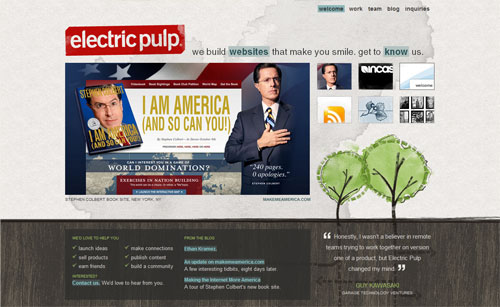
Electric pulp manages to look rough, but if you look closely you realize there is a firm grid and things actually all line up.7. Alignment
Keeping things lined up is as important in Web design as it is in print design. That's not to say that everythingshould be in a straight line, but rather that you should go through and try to keep things consistently placed on a page. Aligning makes your design more ordered and digestible, as well as making it seem more polished.
You may also wish to base your designs on a specific grid. I must admit I don't do this consciously - though obviously a site like PSDTUTS does in fact have a very firm grid structure. This year I've seen a few really good articles on grid design including SmashingMagazine's Designing with Grid-Based Approach & A List Apart'sThinking Outside The Grid. In fact, if you're interested in grid design, you should definitely pay a visit to the aptly named DesignByGrid.com home to all things griddy.
8. Clarity (Sharpness)
Keeping your design crisp and sharp is super important in Web design. And when it comes to clarity, it's all about the pixels.
In your CSS, everything will be pixel perfect so there's nothing to worry about, but in Photoshop it is not so. To achieve a sharp design you have to:
- Keep shape edges snapped to pixels. This might involve manually cleaning up shapes, lines, and boxes if you're creating them in Photoshop.
- Make sure any text is created using the appropriate anti-aliasing setting. I use 'Sharp' a lot.
- Ensuring that contrast is high so that borders are clearly defined.
- Over-emphasizing borders just slightly to exaggerate the contrast.
Further Reading:
I wrote a bit more about clarity in Elements of Great Web Design - the polish. I've noticed that print designers transitioning to Web design, in particular, don't think in pixels, but it really is vital.9. Consistency
Consistency means making everything match. Heading sizes, font choices, coloring, button styles, spacing, design elements, illustration styles, photo choices, etc. Everything should be themed to make your design coherent between pages and on the same page.
Keeping your design consistent is about being professional. Inconsistencies in a design are like spelling mistakes in an essay. They just lower the perception of quality. Whatever your design looks like, keeping it consistent will always bring it up a notch. Even if it's a bad design, at least make it a consistent, bad design.
The simplest way to maintain consistency is to make early decisions and stick to them. With a really large site, however, things can change in the design process. When I designed FlashDen, for example, the process took months, and by the end some of my ideas for buttons and images had changed, so I had to go back and revise earlier pages to match later ones exactly.
Having a good set of CSS stylesheets can also go a long way to making a consistent design. Try to define core tags like
and
in such a way as to make your defaults match properly and avoid having to remember specific class names all the time.
Further Reading:
The ThinkVitamin article How CRAP is your design? discusses Repetition going down the page and how important it is. The article is written by Mike Rundle who designs 9rules, so you know it's worth reading!Get my Book!
Enjoyed this article? I've just completed a book on freelancing that you can purchase online as an eBook. Head over to find out more about How to Be a Rockstar Freelancer.
Author: Collis
Hello! I started Psdtuts+ because years ago reading Photoshop tutorials was how I got into design. You can find me on Twitter or on my blogtheNetsetter.
Add to this the fact that many Web designers (myself included) are self-taught, that Web design is still novel enough to be only a side subject in many design institutions, and that the medium changes as frequently as the underlying technology does.
So today I've put together my 9 principles for good Web design. These are only my opinions and I've tried to link off to more reading on subjects so you don't only hear my voice. Obviously, I have lots of disclaimers: rules are made to be broken, different types of design work differently, and I don't always live up to my own advice. So please read these as they are intended--just some observations I am sharing...
1. Precedence (Guiding the Eye)
Good Web design, perhaps even more than other type of design, is about information. One of the biggest tools in your arsenal to do this is precedence. When navigating a good design, the user should be led around the screen by the designer. I call this precedence, and it's about how much visual weight different parts of your design have.
A simple example of precedence is that in most sites, the first thing you see is the logo. This is often because it’s large and set at what has been shown in studies to be the first place people look (the top left). his is a good thing since you probably want a user to immediately know what site they are viewing.
But precedence should go much further. You should direct the user’s eyes through a sequence of steps. For example, you might want your user to go from logo/brand to a primary positioning statement, next to a punchy image (to give the site personality), then to the main body text, with navigation and a sidebar taking a secondary position in the sequence.
What your user should be looking at is up to you, the Web designer, to figure out.
To achieve precedence you have many tools at your disposal:
- Position — Where something is on a page clearly influences in what order the user sees it.
- Color — Using bold and subtle colors is a simple way to tell your user where to look.
- Contrast — Being different makes things stand out, while being the same makes them secondary.
- Size — Big takes precedence over little (unless everything is big, in which case little might stand out thanks to Contrast)
- Design Elements — if there is a gigantic arrow pointing at something, guess where the user will look?
Further Reading:
You can read more of my thoughts on Precedence in an old PSDTUTS post called Elements of Great Web Design - the polish. Joshua David McClurg-Genevese discusses principles of good web design and design at Digital-Web. Joshua also has the longest name ever :-)2. Spacing
When I first started designing I wanted to fill every available space up with stuff. Empty space seemed wasteful. In fact the opposite is true.
Spacing makes things clearer. In Web design there are three aspects of space that you should be considering:
- Line Spacing
When you lay text out, the space between the lines directly affects how readable it appears. Too little space makes it easy for your eye to spill over from one line to the next, too much space means that when you finish one line of text and go to the next your eye can get lost. So you need to find a happy medium. You can control line spacing in CSS with the 'line-height' selector. Generally I find the default value is usually too little spacing. Line Spacing is technically called leading (pronounced ledding), which derives from the process that printers used to use to separate lines of text in ye olde days — by placing bars of lead between the lines. - Padding
Generally speaking text should never touch other elements. Images, for example, should not be touching text, neither should borders or tables. Padding is the space between elements and text. The simple rule here is that you should always have space there. There are exceptions of course, in particular if the text is some sort of heading/graphic or your name is David Carson :-) But as a general rule, putting space between text and the rest of the world makes it infinitely more readable and pleasant. - White Space
First of all, white space doesn't need to be white. The term simply refers to empty space on a page (or negative space as it's sometimes called). White space is used to give balance, proportion and contrast to a page. A lot of white space tends to make things seem more elegant and upmarket, so for example if you go to an expensive architect site, you'll almost always see a lot of space. If you want to learn to use whitespace effectively, go through a magazine and look at how adverts are laid out. Ads for big brands of watches and cars and the like tend to have a lot of empty space used as an element of design.
Further Reading:
At WebDesignFromScratch there is a great article called the Web 2.0 how-to design guide, which discusses Simplicity - a concept that makes a lot of use of spacing. There's plenty of other useful stuff there too!3. Navigation
One of the most frustrating experiences you can have on a Web site is being unable to figure out where to go or where you are. I'd like to think that for most Web designers, navigation is a concept we've managed to master, but I still find some pretty bad examples out there. There are two aspects of navigation to keep in mind:
Navigation — Where can you go?
There are a few commonsense rules to remember here. Buttons to travel around a site should be easy to find - towards the top of the page and easy to identify. They should look like navigation buttons and be well described. The text of a button should be pretty clear as to where it's taking you. Aside from the common sense, it's also important to make navigation usable. For example, if you have a rollover sub-menu, ensuring a person can get to the sub-menu items without losing the rollover is important. Similarly changing the color or image on rollover is excellent feedback for a user.
Orientation — Where are you now?
There are lots of ways you can orient a user so there is no excuse not to. In small sites, it might be just a matter of a big heading or a 'down' version of the appropriate button in your menu. In a larger site, you might make use of bread crumb trails, sub-headings and a site map for the truly lost.
Further Reading:
SmashingMagazine has a selection of CSS-based navigation styles which are nice to go through, and #3 is one of mine! A List Apart also has a good article about orientation called Where Am I?
4. Design to Build
Life has gotten a lot easier since Web designers transitioned to CSS layouts, but even now it's still important to think about how you are going to build a site when you're still in Photoshop. Consider things like:
- Can it actually be done?
You might have picked an amazing font for your body copy, but is it actually a standard HTML font? You might have a design that looks beautiful but is 1100px wide and will result in a horizontal scroller for the majority of users. It's important to know what can and can't be done, which is why I believe all Web designers should also build sites, at least sometimes. - What happens when a screen is resizes?
Do you need repeating backgrounds? How will they work? Is the design centered or left-aligned? - Are you doing anything that is technically difficult?
Even with CSS positioning, some things like vertical alignment are still a bit painful and sometimes best avoided. - Could small changes in your design greatly simplify how you build it?
Sometimes moving an object around in a design can make a big difference in how you have to code your CSS later. In particular, when elements of a design cross over each other, it adds a little complexity to the build. So if your design has, say three elements and each element is completely separate from each other, it would be really easy to build. On the other hand if all three overlap each other, it might still be easy, but will probably be a bit more complicated. You should find a balance between what looks good and small changes that can simplify your build. - For large sites, particularly, can you simplify things?
There was a time when I used to make image buttons for my sites. So if there was a download button, for example, I would make a little download image. In the last year or so, I've switched to using CSS to make my buttons and have never looked back. Sure, it means my buttons don't always have the flexibility I might wish for, but the savings in build time from not having to make dozens of little button images are huge.
5. Typography
Text is the most common element of design, so it's not surprising that a lot of thought has gone into it. It's important to consider things like:
- Font Choices — Different types of fonts say different things about a design. Some look modern, some look retro. Make sure you are using the right tool for the job.
- Font sizes —Years ago it was trendy to have really small text. Happily, these days people have started to realize that text is meant to be read, not just looked at. Make sure your text sizes are consistent, large enough to be read, and proportioned so that headings and sub-headings stand out appropriately.
- Spacing — As discussed above, spacing between lines and away from other objects is important to consider. You should also be thinking about spacing between letters, though on the Web this is of less importance, as you don't have that much control.
- Line Length — There is no hard and fast rule, but generally your lines of text shouldn't be too long. The longer they are, the harder they are to read. Small columns of text work much better (think about how a newspaper lays out text).
- Color — One of my worst habits is making low-contrast text. It looks good but doesn't read so well, unfortunately. Still, I seem to do it with every Web site design I've ever made, tsk tsk tsk.
- Paragraphing — Before I started designing, I loved to justify the text in everything. It made for nice edges on either side of my paragraphs. Unfortunately, justified text tends to create weird gaps between words where they have been auto-spaced. This isn't nice for your eye when reading, so stick to left-aligned unless you happen to have a magic body of text that happens to space out perfectly.
Further Reading:
Nick La at WebDesignerWall has a great article about online typography called Typographic Contrast and Flow .6. Usability
Web design ain't just about pretty pictures. With so much information and interaction to be effected on a Web site, it's important that you, the designer, provide for it all. That means making your Web site design usable.
We've already discussed some aspects of usability - navigation, precedence, and text. Here are three more important ones:
- Adhering to Standards
There are certain things people expect, and not giving them causes confusion. For example, if text has an underline, you expect it to be a link. Doing otherwise is not good usability practice. Sure, you can break some conventions, but most of your Web site should do exactly what people expect it to do! - Think about what users will actually do
Prototyping is a common tool used in design to actually 'try' out a design. This is done because often when you actually use a design, you notice little things that make a big difference. ALA had an article a while back called Never Use a Warning When You Mean Undo, which is an excellent example of a small interface design decision that can make life suck for a user. - Think about user tasks
When a user comes to your site what are they actually trying to do? List out the different types of tasks people might do on a site, how they will achieve them, and how easy you want to make it for them. This might mean having really common tasks on your homepage (e.g. 'start shopping', 'learn about what we do,' etc.) or it might mean ensuring something like having a search box always easily accessible. At the end of the day, your Web design is a tool for people to use, and people don't like using annoying tools!
Further Reading:
AListApart has lots of articles on web usability.
Electric pulp manages to look rough, but if you look closely you realize there is a firm grid and things actually all line up.
7. Alignment
Keeping things lined up is as important in Web design as it is in print design. That's not to say that everythingshould be in a straight line, but rather that you should go through and try to keep things consistently placed on a page. Aligning makes your design more ordered and digestible, as well as making it seem more polished.
You may also wish to base your designs on a specific grid. I must admit I don't do this consciously - though obviously a site like PSDTUTS does in fact have a very firm grid structure. This year I've seen a few really good articles on grid design including SmashingMagazine's Designing with Grid-Based Approach & A List Apart'sThinking Outside The Grid. In fact, if you're interested in grid design, you should definitely pay a visit to the aptly named DesignByGrid.com home to all things griddy.
8. Clarity (Sharpness)
Keeping your design crisp and sharp is super important in Web design. And when it comes to clarity, it's all about the pixels.
In your CSS, everything will be pixel perfect so there's nothing to worry about, but in Photoshop it is not so. To achieve a sharp design you have to:
- Keep shape edges snapped to pixels. This might involve manually cleaning up shapes, lines, and boxes if you're creating them in Photoshop.
- Make sure any text is created using the appropriate anti-aliasing setting. I use 'Sharp' a lot.
- Ensuring that contrast is high so that borders are clearly defined.
- Over-emphasizing borders just slightly to exaggerate the contrast.
Further Reading:
I wrote a bit more about clarity in Elements of Great Web Design - the polish. I've noticed that print designers transitioning to Web design, in particular, don't think in pixels, but it really is vital.9. Consistency
Consistency means making everything match. Heading sizes, font choices, coloring, button styles, spacing, design elements, illustration styles, photo choices, etc. Everything should be themed to make your design coherent between pages and on the same page.
Keeping your design consistent is about being professional. Inconsistencies in a design are like spelling mistakes in an essay. They just lower the perception of quality. Whatever your design looks like, keeping it consistent will always bring it up a notch. Even if it's a bad design, at least make it a consistent, bad design.
The simplest way to maintain consistency is to make early decisions and stick to them. With a really large site, however, things can change in the design process. When I designed FlashDen, for example, the process took months, and by the end some of my ideas for buttons and images had changed, so I had to go back and revise earlier pages to match later ones exactly.
Having a good set of CSS stylesheets can also go a long way to making a consistent design. Try to define core tags like
and
in such a way as to make your defaults match properly and avoid having to remember specific class names all the time.